

Petalk AI II Dog Camera Automatic Treat Dispenser, 5G WiFi Full HD Pet Camera with 180° Pan Full-Room View,Night Vision,Two Way Audio for Dogs and Cats,Compatible with Alexa (Support 5G WiFi)
$99.99
Related Products







Product description


 Pet tech, Pet care the easy way!
Skymee is committed to providing the best user experience, combining pet care with phone app to help you become a better pet owner. We are committed to:
Solving separation anxiety both pet and owners Looking after your pet anywhere Remote interaction Keep your pets active
Skymee Petalk AI II New Pet Camera
Better to see, talk and play with your dog anywhere
Petalk AI II pet camera:
Higher-definition camera with 4 adjustable resolutionsClearer microphone with lower noise floorWider field of vision with 180° rotation panNight vision with auto & manual turn on/off
More dispenser way:
Manually press the button to dispense treatRemote one-click to feed via appSet feeding programs for automatic treat dispense
Full HD Real-time Video Two-way Audio Automatic / Manual Treat Dispenser Motion Detection Day & night TF recording 8 People Watch Video Work with Alexa Supports 2.4G and 5G WiFi

Romote HD pet camera and easy to use APP:
Skymee dog camera has a 1080p full HD camera, romotely monitor your furry baby anywhere via skymee app.

Two Way Audio:
Petalk AI II camera will notify you when your pet trick or treat by motion detection. Know what’s going on at home and keep your dog calm down by your voice.

Auto/Manual treat dispenser:
Fill your pet’s favorite treats (recommended 4mm~17mm)and dispense via pressing button/mobile control, inspiring your dog to catch treats and bring more fun.
Even if you are busy at work, you can set up feed program to reward your dog.

Night vision(Auto & Manual)
Petalk AI II camera has a more advanced design, which can manually turn on / off IR night vision or automatically adjust based on the light.

Motion detection & History list
Opened motion detection and app message notifications, Petalk Ai II will alert you when detecting your dogs behavior.
Even if you miss the push message, you can see what’s happened in the app history list.

Day & night TF recording
Live video can also be recorded automatically after the TF card installed(not included), allow you monitor your pets 24 hours a day, 7 day a week. And the old video will be replaced automatically by new if TF card is full. No longer worry about missing any moment.

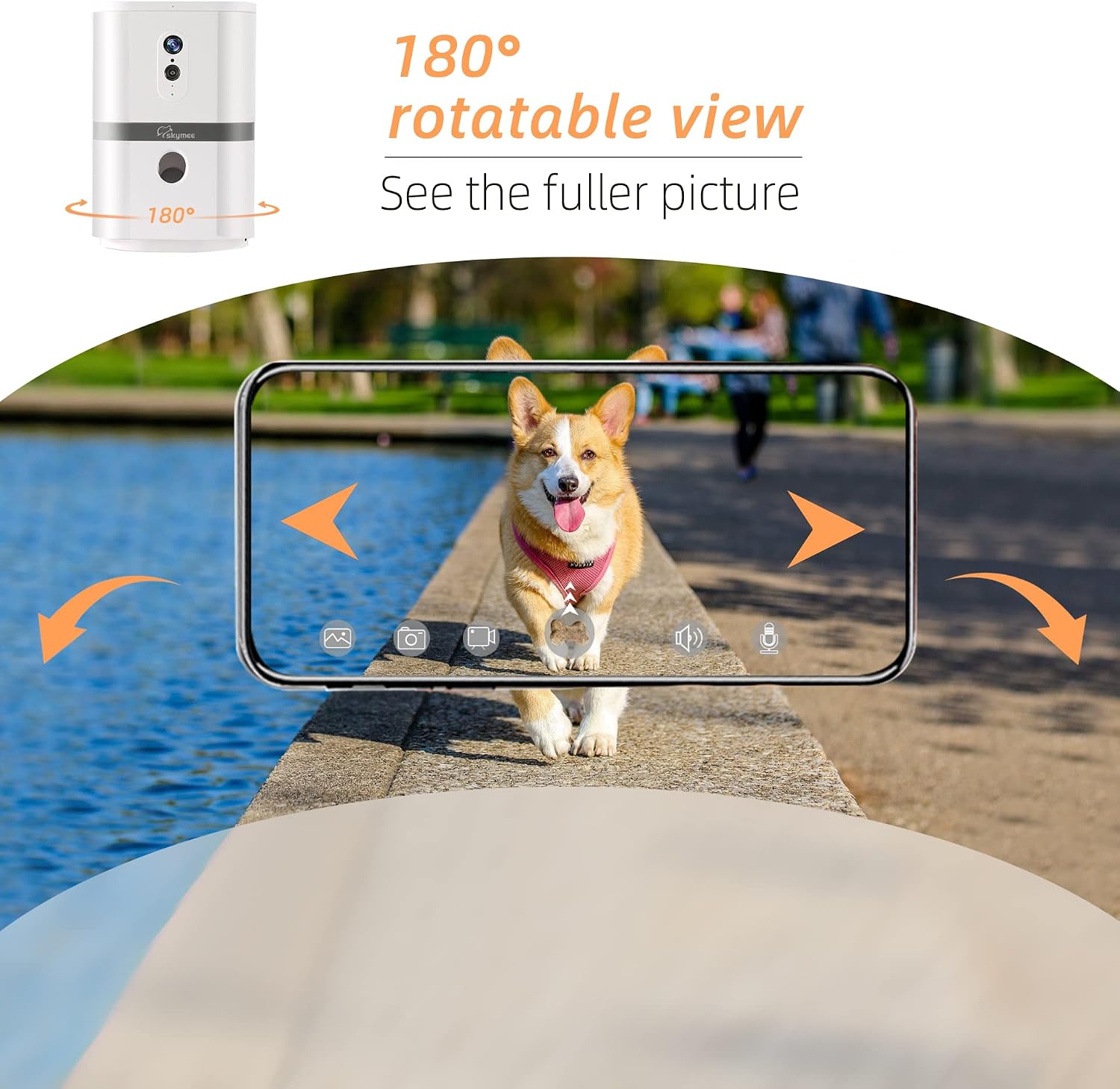
180°Pan & 4X Zoom
Skymee pet camera provides horizontal 180° rotation with 4x digital zoom function for a complete coverage of your home.

New dispenser design
The new design of the rotating tray maximize the smoothy dispense of treat
with 2 replaceable food trays: tray-1 of 4 ~ 11mm and tray-2 of 11 ~ 17mm, compatible with most brand treats.

Supports 2.4G and 5G WiFi.
The newly designed Skymee Petalk AI II is supported by 2.4G and 5G WiFi.

3 Minute Easy Set Up
Power on the device by type-c USB cable, and download Skymee App.Please open the Skymee app and register your app account via email or mobile number, press and hold the SET button for 5s.Please add the Petalk AI II and enter the correct WIFI password(Need 2.4G hz WiFi and wifi password length does not exceed 16 characters).Let the device camera read the QR of the mobile phone, and after hearing the “beep”, click Next and wait for connection succeed.
Easy to use Skymee app:
Press and hold Feed button to slide up, the treats will fall into the hole and pop up.set up the feeding plan(1~8), feeding time(0:00~24:00), portions(1~30), and date(Sat.~Sun.) etc.Swipe the screen left or right to view the entire room, the rotation angle is 180 °Click the Hear button to Hear from your home. Press and hold the Speak button to speak to your pets.Click on the photo or video button and save it to your phone’s memory.

How to connect a second or more phones to Petalk AI II?
After you connect your phone to Skymee Petalk AI II, please open the account settings and set a password for your app account.Your family and friends can log in to your account on their phones and watch video at the same time.How to protect privacy?
When someone looks at the video, the Skymee device light will turn blue.After you change the app account password, others can’t log in.

How to use with alexa?
Add skymee skill in Alexa appOpen skymee skill, login and bind the skymee app account. Pay attention to the account format (+ 1-xxxxxxxxxx)Open the skymee app, and tap Set to name a word for your device, such as TomCheck the skymee skill in the alexa app, use the voice command to open the skymee skill, and perform voice feeding control, such as: Tom, open skymee skill, feed one.
Connect wifi
Easy to use
Multi user online
Work with alexa
Add to Cart
Add to Cart
Customer Reviews
3.8 out of 5 stars 107
—
4.0 out of 5 stars 171
3.0 out of 5 stars 29
Price
$139.99$139.99
— no data
$69.99$69.99
— no data
USE
Pet Treat Camera Toy Interactive Pet Toy Smart Pet Camera Treat Dispenser Smart Pet Feeder with Camera
Use Requirement
Need 2.4Ghz home WiFi Bluetooth connection For 2.4Ghz and 5Ghz home WiFi For 2.4Ghz and 5Ghz home WiFi
Product Dimensions : 5.5 x 5.5 x 8.27 inches; 2.43 Pounds
Date First Available : November 24, 2022
Manufacturer : Shenzhen Skymee Technology
ASIN : B0BSKX51KY
Best Sellers Rank: #304,037 in Pet Supplies (See Top 100 in Pet Supplies) #435 in Pet Cameras & Monitors
Customer Reviews: 3.8 3.8 out of 5 stars (53) var dpAcrHasRegisteredArcLinkClickAction; P.when(‘A’, ‘ready’).execute(function(A) { if (dpAcrHasRegisteredArcLinkClickAction !== true) { dpAcrHasRegisteredArcLinkClickAction = true; A.declarative( ‘acrLink-click-metrics’, ‘click’, { “allowLinkDefault”: true }, function (event) { if (window.ue) { ue.count(“acrLinkClickCount”, (ue.count(“acrLinkClickCount”) || 0) + 1); } } ); } }); P.when(‘A’, ‘cf’).execute(function(A) { A.declarative(‘acrStarsLink-click-metrics’, ‘click’, { “allowLinkDefault” : true }, function(event){ if(window.ue) { ue.count(“acrStarsLinkWithPopoverClickCount”, (ue.count(“acrStarsLinkWithPopoverClickCount”) || 0) + 1); } }); });
【SKYMEE Dog video Camera Lens Design】:1080p full HD camera & infrared LED night vision with a 120-degree wide-angle view, by monitor your pet on your phone,day & night.
【Dog Treat Dispenser】The pet camera Packed with 2 trays, effectively compatible with treats from 11mm-14mm and 14mm ~ 17mm,you can Remotely release pets favorite snacks and play a game with your pets, avoid your love pets getting bored.
【2-Way Audio&Motion Detection】AI smart speaker control & 180°PTZ and 4x digital zoom,the Petalk AI Ⅱ will notify you by motion detection Know what’s going on at home and talk to calm them down via the app,you can chat and play with your pets.
【Multi-account Login】One app account can be support 8 people(with your friends、familly、colleague)view online,at the same time photos and videos also can be share your social media platform.
【SKYMEE Dog Camera Setup】: 1)Plug in to a power outlet using USB cord =>2)Download the full free app“Skymee” =>3)Connect to 2.4G & 5G wifi. Contact technical support at any time via the app.12-hour response service is friendly offered.
10 reviews for Petalk AI II Dog Camera Automatic Treat Dispenser, 5G WiFi Full HD Pet Camera with 180° Pan Full-Room View,Night Vision,Two Way Audio for Dogs and Cats,Compatible with Alexa (Support 5G WiFi)
Add a review

$99.99
mungseng ng –
Treat Time !!!
Skymee, you did it again! Surprising me every time with your innovations. Great job!I have to give my cat, Pillow, dental treats everyday. If I missed a night, Pillow would get some mad at me and meow all night until I give him treat. This is a perfect little cat toy for my baby. The fact of the feeder can be rotating through the app, it makes the whole experience of giving your cat treat FUN!! If you are like me who like to tease your cat once awhile, then you will like this one. Seeing him randomly jump up because of a surprise treat time, it makes me laugh so hard. I bet you would found it funny when you see your cat got a little shocking jump. Can’t stop falling in love with this brand.For the product itself.1) I was worry about connecting to the WiFi for the first time setup process after I read other comments, which other people had a hard time to set it up. I want to say, it wasn’t as easy to connect as the other feeder they sell, However, it still wasn’t that hard for me.Here is some Tips if you have first time setup problem.After you scanned the QR code and put your WiFi password in. You would see your screen saying if you see the machine have a green light click “continue” something like that in the app. Don’t click “continue” yet, click the setup on top of the machine once. Then your machine should act like they are trying to give treats or something. Make sure you don’t put treats in it yet. Then your feeder should turn the light to red because it is empty. Then you click the other button in the app say you don’t see the green light. It will takes you to another page and have you to hold down the reset button on the feeder for 5 seconds until you hear the beep. Once it beep the light will turn green. And you click “continue” in the app. And then the QR code on your phone should work for the camera in the machine. It wasn’t that hard. I just played a little bit with the app in order to finish the first time setup.2, Do you know that this feeder also have a motion sensor? I love seeing Pillow walking pass the feeder and waiting or trying to figure out how to get more treats. Haha, have you ever wonder what your cats doing when you’re not home? There you go! Haha3, just take a look of it. It is so tiny, and have a timeless modern looking design. It can fit anywhere in the house. Great design.
Samantha Ray –
I’ve ordered 3 and they never work
I’ve tried this product three times. It never stays connected to the internet and once it disconnects, it’s nearly possible to reconnect. Also, the treat dispenser will randomly start shooting out treats without me even being in the app. It’s a crappy product and I’d advise against wasting your money.
Magda –
Great product! Have had for years!
I have had this device for years now and it still works great! I live in the US and bought it for when I travel. I have been to Belgium and Scotland and was able to use it from that far. Any questions you have, their customer service is great! The app is simple as well as the set up. Its so fun to see your animal and place when you are gone.
REBA –
Does not stay connected!
Love that I can watch my new puppy but do not like how the connection goes in and out all day long. Was a little tricky to set up. Sometimes you have to remove the device and reinstall. It has great picture quality day and night, and you can talk to your pet and send them treats if you wanted. I have not used the treat feature yet. You can zoom in and also move the camera by the app on your phone which is a nice feature. Motion sensor does not work like I thought it would. It is sporadic in what it picks up and takes pictures of.
Majennabear –
Peace of mind for both pets and parents
I was really sad to have to leave my cats home while away even though I know my neighbours are really good to them and my cats are often visiting them for treats! But one of my cats in particular is really clingy and very affectionate, she looks for me when I’m not home my kids say so we’re both really attached to one another and suffer from separation anxiety. I recently left the country to visit my family and the separation was weighing on me (+one of my other cat is quiet old and loosing his mind a little too). So after researching a way to keep an eye on them while away, I found the new Skymee. It did everything I was hoping and more. So I chanced it and don’t regret I did. Luna’s taken a real shine on her new friend, it sounds like her mummy and gives her treats. I was able to follow her routine and help her keep it, she’d expect her treats and lie beside Skymee while I’d be talking to her before nap times until she went to the couch to fall asleep. If I didn’t see her for a while, I’d call out to her and she’d hear me from somewhere else in the house and turn up in the room where Skymee was plugged in within a minute or two (unless she was out in the garden of course). It was useful too to just hear out before starting to move the device around in case my neighbour was there during feeding time, as I didn’t want to look like I was spying on him out of decency. Setting up was not difficult, pretty straightforward. If you have any issue, their customer care was excellent, really understanding and sympathetic and will reply promptly to your query. Other all, I’d definitely buy this again and will recommend it to anyone who feels the need to stay close to their pets while away from home. It didn’t spook out my cats like I was afraid it might have and they really got used to the company that they weren’t as alone as they thought they were. My little dog stayed at her friends house but I’ve no doubt she’ll love the unexpected attention she’ll get from Skymee when she’ll be by herself when I’m out on errands too. If you’re in any doubt, don’t be, it’ll take a huge weight out of your shoulders once you start using it! If you love your pets or worry about them (and yourself!) then this is the gadget for you.
Amazon Customer –
Easy to use
My cats are a little afraid of the treat dispenser as it is loud but otherwise a good product. I can see what they are doing when I’m not home. Took a while to figure how to set up but once it’s set up it works good.
Salty Beach –
Great picture quality
Picture quality is very good and shoots out treats as it should. I had some trouble connecting while traveling but once I started using it at home the connection has been great! The camera also has great motion to move about the room. I would recommend this item I use it all the time.
Evher G. –
wifi issue!!
It’s not going to function or work unless it’s really close to your wifi router👎🏻
Cliente Amazon –
Honestly I highly regret buying it and If I could I would send it back. I connected this camera at least 40 times since I got it. It is not reliable. I leave the house to go to work I open the app and it says “no camera connected” 😑 So basically I cannot check on my puppy. And it didn’t happen only once. It has been happening since I got it. I am tired. Don’t buy it guys. You cannot trust it. And also I hate to having to reconnect it and check it every morning before leaving for work. Makes it harder instead of easier. Ps the quality of the image is bad also. Definitely you can find better cameras around.
Chris Tann –
Simple enough to set up, but completely failed to connect to my TP-Link mesh WiFi. I even tried a different router incase that might help, but no luck. Tried multiple times, resets, etc, but nothing worked. Sad, my pup will have to wait for her treats!Update: Worked with Skymee support, who were very helpful, but in the end, there is a problem with the device software. I did manage to connect to the Wifi by doing a “Manual” connection, rather than the Bluetooth connection, but even then, it would only connect to the mesh hub, and not any of the mesh routers, so it is useless to me.Sad to see this awesome hardware crippled by poor software!